Build an Omegle clone using WebRTC and websockets
A guide on how to build an Omegle clone using modern tech like WebRTC and websockets. I built the entire thing using Sveltekit so this guide will be in that.
Remember Omegle? Yes that video calling website that got shutdown in 2023. Don’t tell me you did not used it even once.
In India it kinda blew up in popularity due to some youtubers making videos about it. Have some good memories talking to strangers with my friends.
Now that I can call myself a full stack software engineer specializing in web dev when innocent people ask me what do I do. I can build it, not the memories but the damn website.
And I did, here’s how. (Live website and github links at the end)
First, Research
Don’t be that guy who just jumps on coding the thing before knowing what it takes to build it. So I did the same, searched on youtube to copy other people’s work. It’s not like this is an unique idea or something. There are plenty of clones of the original.
I found a well documented youtube video showing a similar thing here. This is in hindi, the same guy has an explainer video of how all this works. It was a saviour.
Now how it works
Working with WebRTC can be a bit tricky sometimes even though the API is quite good and intuitive (if you have the basics of signaling and p-2-p connection done).
So what we need is a signaling server. A server which works as a broker to connect the peers. And after the connection is done, you do not need the server anymore.
Cool right?
Here’s a diagram to help you understand.
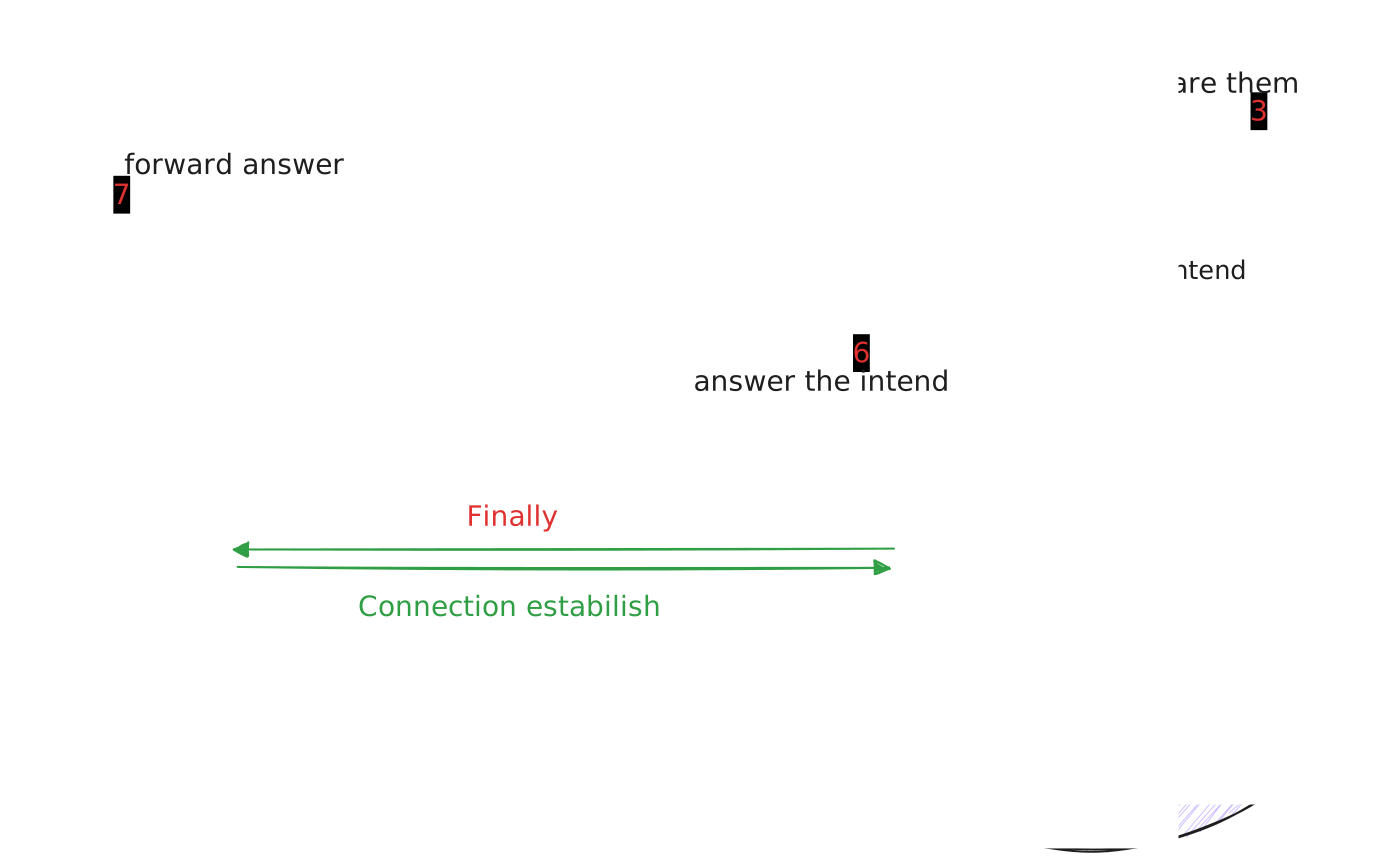
Let’s create the signaling server
For the signaling server I’m using SocketIO, which is a very efficient way to not fight with the socket connections and get some work done.
Initially I built the first version of the server in Deno. It was fun and all but it lacked hosting options. So I switched to vanilla NodeJS.
Here’s the server setup.
// Import required modules
const { createServer } = require("http");
const { Server } = require("socket.io");
const { instrument } = require("@socket.io/admin-ui");
const admin = require("firebase-admin");

// Load environment variables
const dotenv = require("dotenv");
dotenv.config();

// Initialize Firebase Admin with credentials from environment
const firebaseAdminCred = JSON.parse(process.env.SERVICE_ACCOUNT_CREDENTIAL);

admin.initializeApp({
  credential: admin.credential.cert(firebaseAdminCred),
});

// Create basic HTTP server with health check endpoint
const httpServer = createServer((req, res) => {
  // Health check endpoint for monitoring
  if (req.method === "GET" && req.url === "/health") {
    res.writeHead(200, { "Content-Type": "text/plain" });
    res.end("ok");
    return;
  }

  // Simple homepage showing server status, used for deployment debugging
  if (req.method === "GET" && req.url === "/") {
    res.writeHead(200, { "Content-Type": "text/html" });
    res.end(`
      <html>
        <head>
          <title>WebRTC Server</title>
        </head>
        <body>
          <h1>WebRTC Server</h1>
          <p>Server is running successfully.</p>
          <p>Status: <a href="/health">Check health</a></p>
        </body>
      </html>
    `);
    return;
  }
});

// Initialize Socket.IO with CORS settings
const io = new Server(httpServer, {
  cors: {
    // Allow connections only from these origins
    origin: [
      "https://kawaiikiwi.online",
      "http://kawaiikiwi.online",
      "http://www.kawaiikiwi.online",
      "https://www.kawaiikiwi.online",
      "https://admin.socket.io",
    ],
    credentials: true,
    methods: ["GET", "POST"],
  },
});

// Store connected users and their pairings
// This is a not so efficient way of keeping track of peered users.
// Ideally we can use something like Redis to store these values momentarily.
const users = {};

// Middleware to verify Firebase authentication token
io.use(async (socket, next) => {
  const token = socket.handshake.auth.token;
  if (!token) {
    console.log("Token not found");
    return next(new Error("Authentication token missing"));
  }

  try {
    const decodedToken = await admin.auth().verifyIdToken(token);
    socket.user = decodedToken;
    console.log("User authenticated");
    next();
  } catch (error) {
    console.error("Authentication error:", error);
    return next(new Error("Authentication failed"));
  }
});

// Handle socket connections
io.on("connection", (socket) => {
  const callerID = socket.id;

  // When a user wants to find a peer
  socket.on("peer:find", () => {
    // Add user to the pool of available users
    users[callerID] = null;

    // Find other available users (not paired with anyone)
    const availableUsers = Object.keys(users).filter(
      (userID) => userID !== socket.id && users[userID] === null
    );

    // Randomly select an available user
    const randomUser =
      availableUsers[Math.floor(Math.random() * availableUsers.length)];

    if (randomUser) {
      // Create pairing between users
      users[callerID] = randomUser;
      users[randomUser] = callerID;

      // Notify both users about the pairing
      io.to(randomUser).emit("peer:accepted");
      io.to(callerID).emit("peer:found");
      console.log(`paired ${callerID} with ${randomUser}`);
    } else {
      // No available users found
      console.log(`no available users for ${callerID}`);
      io.to(callerID).emit("peer:alone");
    }
  });

  // Handle WebRTC signaling - when a peer sends an offer
  socket.on("peer:offer", (offer) => {
    console.log("peer:offer", socket.id);
    const sendTo = users[socket.id];
    if (sendTo) {
      io.to(sendTo).emit("peer:call", offer);
    }
  });

  // Handle WebRTC signaling - when a peer sends an answer
  socket.on("peer:answer", (answer) => {
    console.log("peer:answer", socket.id);
    const sendTo = users[socket.id];

    if (sendTo) {
      io.to(sendTo).emit("peer:answer", answer);
    }
  });

  // Handle WebRTC ICE candidates for connection establishment
  socket.on("peer:sent:icecandidate", (candidate) => {
    console.log("peer:sent:icecandidate", socket.id);
    const sendTo = users[socket.id];
    if (sendTo) {
      io.to(sendTo).emit("peer:sent:icecandidate", candidate);
    }
  });

  // Handle user disconnection
  socket.on("disconnect", () => {
    // Notify partner if user was paired
    const partnerId = users[callerID];
    if (partnerId && users[partnerId] === callerID) {
      io.to(partnerId).emit("peer:disconnected");
      users[partnerId] = null;
    }

    // Remove user from pool
    delete users[callerID];
  });

  // Handle connection errors
  socket.on("connect_error", (error) => {
    console.error("Connection error:", error);
    socket.emit("error", "Failed to connect");
  });
});

// Setup Socket.IO Admin UI for monitoring
instrument(io, {
  auth: {
    type: process.env.SOCKET_ADMIN_TYPE,
    username: process.env.SOCKET_ADMIN_USERNAME,
    password: process.env.SOCKET_ADMIN_PASSWORD,
  },
  mode: "production",
});

// Start the server
httpServer.listen(8080, "0.0.0.0", () => {
  console.log("Server is running on 0.0.0.0:8080");
});
Here you might have noticed I am using firebase admin SDK to verify the incoming requests.
This can be very important as with WebRTC the IP addresses of peers is visible on connection intends and connection answers. If anyone gets their way into the socket server and was able to capture these delicate info, it will be a huge security blunder.
Anyways, let’s move on.
Configure the Sveltekit app
Now I have used Sveltekit because it’s just so simple. But the code should work on any web framework as it’s just JavaScript.
- First: access to user camera and mic
I used the vanilla navigator.mediaDevices API to get the local stream
localStream = await navigator.mediaDevices.getUserMedia({ video: true, audio: true });
    if (localVideo) {
        localVideo.srcObject = localStream;
    }
socketStore.findPeer();
In the video chat page, I used a button to initialize the entire process. See.
// Function that handles starting a video chat session
const handleVideoChatStart = async () => {
    try {
        // Get the user's authentication token
        // This is required for security verification with our server
        userIdToken = await userStore.getUser()?.getIdToken() ?? ""
        if (userIdToken === "") {
            throw new Error("User not found");
        }

        // Check if we have an active socket connection
        // If not, establish one before proceeding
        if (!socket || socket.connected === false || socket === null) {
            await socketStore.connect() // Will show how socketStore configured later
        }

        try {
            // Request access to user's camera and microphone
            // This will trigger the browser's permission prompt
            localStream = await navigator.mediaDevices.getUserMedia({ video: true, audio: true });

            // Once we have the media stream, display it in the local video element
            if (localVideo) {
                localVideo.srcObject = localStream;
            }

            // Start looking for a peer to connect with
            socketStore.findPeer();
        } catch (error) {
            // Handle any errors related to accessing media devices
            console.error('Error getting user media:', error);
            alert('Error getting user media, please try again');
        }
    } catch (error) {
        // If there's an authentication error, redirect to login
        alert("Error starting chat, make sure you sign in")
        goto('/login');
    }
};
Second: socket store setup
I defined a class SocketStore() and exported that to be used elsewhere. You can use different ways, the functions can stay the same.
// Import required Socket.IO client library and types
import { io, Socket } from 'socket.io-client';
// Import server URL from environment variables
import { PUBLIC_SOCKET_SERVER_URL } from '$env/static/public';
// Import user store for authentication
import { userStore } from './user.svelte';

/**
 * SocketStore class handles all WebSocket communication for WebRTC signaling
 * This acts as a central store for managing the socket connection and related methods
 */
class SocketStore {
	// Socket instance stored as reactive state using Svelte's $state
	private socket = $state<Socket | null>(null);

	// Get the current socket instance
	getSocket() {
		return this.socket;
	}

	// Establish a new socket connection with authentication
	async connect() {
		try {
			// Clean up any existing connection first
			this.disconnect();

			// Validate server URL exists in environment
			if (!PUBLIC_SOCKET_SERVER_URL || PUBLIC_SOCKET_SERVER_URL === null) {
				throw Error('Socket server url not found in env');
			}

			// Create new socket connection with auth token
			this.socket = io(PUBLIC_SOCKET_SERVER_URL, {
				auth: {
					token: await userStore.getIdToken()
				}
			});
			return this.socket;
		} catch (e) {
			console.log(e);
			throw new Error('Socket connection error');
		}
	}

	// Safely disconnect the socket if it exists
	disconnect() {
		if (this.socket) {
			this.socket.disconnect();
		}
	}

	// Emit event to find a peer for video chat
	findPeer() {
		console.log('finding peer');
		if (this.socket) {
			this.socket.emit('peer:find');
		}
	}

	// Send generic message with WebRTC session data
	sendMessage(message: string, data: RTCSessionDescriptionInit | RTCIceCandidateInit) {
		if (this.socket) {
			this.socket.emit('message', message, data);
		}
	}

	// Send WebRTC connection offer to peer
	sendConnectionOffer(offer: RTCSessionDescriptionInit) {
		if (this.socket) {
			this.socket.emit('peer:offer', offer);
		}
	}

	// Send WebRTC connection answer to peer
	sendConnectionAnswer(answer: RTCSessionDescriptionInit) {
		if (this.socket) {
			this.socket.emit('peer:answer', answer);
		}
	}

	// Send ICE candidate information to peer
	// ICE candidates are used to establish the optimal connection path
	sendIceCandidate(candidate: RTCIceCandidateInit) {
		if (this.socket) {
			this.socket.emit('peer:sent:icecandidate', candidate);
		}
	}
}

// Export a single instance to be used throughout the app
export const socketStore = new SocketStore();
Some of these functions can look complicated, but will be used in the next sections.
Setup WebRTC config
Just like we have now setup the socket config, let’s setup the config for the WebRTC connections and ICE servers.
// Class to handle WebRTC configuration and peer connections
class RTCConfig {
	// Define ICE (Interactive Connectivity Establishment) servers
	// STUN servers help peers discover their public IP addresses
	private ICE_SERVERS = [
		{
			urls: 'stun:stun.l.google.com:19302' // Google's public STUN server
		}
	];

	// Initialize RTCPeerConnection with ICE servers config
	// Using Svelte 5's $state for reactivity
	private peerConnection: RTCPeerConnection = $state(
		new RTCPeerConnection({
			iceServers: this.ICE_SERVERS,
			iceCandidatePoolSize: 10 // Pre-gather ICE candidates
		})
	);

	// Create a fresh peer connection with the same config
	private createNewPeerConnection(): RTCPeerConnection {
		this.peerConnection = new RTCPeerConnection({
			iceServers: this.ICE_SERVERS,
			iceCandidatePoolSize: 10
		});
		return this.peerConnection;
	}

	// Get the current peer connection instance
	getPeerConnection(): RTCPeerConnection {
		return this.peerConnection;
	}

	// Set up a new peer connection with all necessary event handlers
	setupPeerConnection(
		localStream: MediaStream, // User's local audio/video stream
		onTrackCallback: (event: RTCTrackEvent) => Promise<void>, // Handler for receiving remote tracks
		onIceCandidateCallback: (event: RTCPeerConnectionIceEvent) => void, // Handler for ICE candidates
		onDisconnectCallback: () => void // Handler for connection termination
	): RTCPeerConnection {
		// Start fresh with a new connection
		this.createNewPeerConnection();

		// Add all local audio/video tracks to the connection
		localStream.getTracks().forEach((track) => {
			this.peerConnection.addTrack(track, localStream);
		});

		// Set up event handlers for incoming media and ICE candidates
		this.peerConnection.ontrack = onTrackCallback;
		this.peerConnection.onicecandidate = onIceCandidateCallback;

		// Monitor connection state changes
		this.peerConnection.oniceconnectionstatechange = () => {
			console.log('ICE connection state:', this.peerConnection.iceConnectionState);
			// Handle disconnection scenarios
			if (
				this.peerConnection.iceConnectionState === 'disconnected' ||
				this.peerConnection.iceConnectionState === 'failed' ||
				this.peerConnection.iceConnectionState === 'closed'
			) {
				onDisconnectCallback();
			}
		};

		return this.peerConnection;
	}

	// Handle incoming connection offers
	async answerOffer(offer: RTCSessionDescriptionInit) {
		await this.peerConnection.setRemoteDescription(offer);
	}

	// Create and set a connection offer to send to peer
	async createOffer() {
		const offer = await this.peerConnection.createOffer();
		await this.peerConnection.setLocalDescription(offer);
		return offer;
	}

	// Create and set a connection answer in response to an offer
	async createAnswer() {
		const answer = await this.peerConnection.createAnswer();
		await this.peerConnection.setLocalDescription(answer);
		return answer;
	}
}

// Export a singleton instance for app-wide use
export const rtcConfig = new RTCConfig();
This provides some helper functions which handles things like making an connection offer (a.k.a call), answering the offer and setting up the ICE servers.
But wait didn’t I told you that this will not need any server other than the socket one? Then what is the ICE server?
ICE servers (Interactive Connectivity Establishment servers) are the server that are responsible for finding the best connection path between peers. Let’s say your internet router is protected buy a firewall or a proxy. In that case these are the server will ensures a fast connection path is found during setting the connection.
You can think of them as a navigator for finding the highway of data packets to travel through.
We are using google’s ICE servers.
Setup the socket listeners
If you see the server files, you will see there are multiple SocketIo events been emitted by the server like this.
  // Handle WebRTC signaling - when a peer sends an offer
  socket.on("peer:offer", (offer) => {
    console.log("peer:offer", socket.id);
    // ... some operations
  });

  // Handle WebRTC signaling - when a peer sends an answer
  socket.on("peer:answer", (answer) => {
    console.log("peer:answer", socket.id);
    // ... some operations
  });

    // Handle WebRTC ICE candidates for connection establishment
  socket.on("peer:sent:icecandidate", (candidate) => {
    console.log("peer:sent:icecandidate", socket.id);
    // ... some operations
  });
So what we need to do now is to consume those events using even listeners in the front end. Let’s setup that.
Here I am using new Svelte 5 runes syntax. Feel free to use useEffect hook if you are using react.
The idea is to initialize these listeners on the page. So that we can handle the incoming events.
// Main function to set up all socket event listeners
const setupSocketListeners = async () => {
    // Get socket instance from our store
    const socket = socketStore.getSocket();
    if (!socket) return;

    // When the peer accepts our connection request
    socket.on('peer:accepted', () => {
        // Clear any existing timeout for finding peers
        if (findingPeerTimeout) {
            clearTimeout(findingPeerTimeout);
        }

        // Verify we have access to user's media stream
        if (!localStream) {
            alert('Error: No local stream found');
            return;
        }

        // Initialize WebRTC peer connection with our local stream
        // and callback handlers for various events
        peerConnection = rtcConfig.setupPeerConnection(
            localStream,
            handleTrack,
            handleIceCandidate,
            handleDisconnect
        );
    });

    // When a peer is found and ready to connect
    socket.on('peer:found', async () => {
        // Clear any existing timeout for finding peers
        if (findingPeerTimeout) {
            clearTimeout(findingPeerTimeout);
        }

        // Verify we have access to user's media stream
        if (!localStream) {
            alert('Error: No local stream found');
            return;
        }

        // Initialize WebRTC peer connection
        peerConnection = rtcConfig.setupPeerConnection(
            localStream,
            handleTrack,
            handleIceCandidate,
            handleDisconnect
        );

        // Create and send connection offer to the peer
        const offer = await rtcConfig.createOffer();
        socketStore.sendConnectionOffer(offer);
    });

    // When receiving ICE candidates from the peer
    // ICE candidates contain information about how to connect to a peer
    socket.on('peer:sent:icecandidate', (candidate) => {
        if (!rtcConfig.getPeerConnection()) {
            throw new Error('Error: No peer connection found');
        }
        if (candidate.candidate) {
            const iceCandidate = new RTCIceCandidate(candidate);
            // If we already have remote description, add candidate immediately
            if (rtcConfig.getPeerConnection().remoteDescription) {
                console.log('adding ice candidate', candidate);
                rtcConfig.getPeerConnection().addIceCandidate(iceCandidate);
            } else {
                // Otherwise queue the candidate for later
                console.log('queuing ice candidate', candidate);
                pendingIceCandidates.push(iceCandidate);
            }
        }
    });

    // When receiving a call (connection offer) from a peer
    socket.on('peer:call', async (offer) => {
        // Process the received offer and create an answer
        await rtcConfig.answerOffer(offer);
        const answer = await rtcConfig.createAnswer();
        socketStore.sendConnectionAnswer(answer);
    });

    // When receiving an answer to our connection offer
    socket.on('peer:answer', async (answer) => {
        if (!rtcConfig.getPeerConnection()) {
            throw new Error('Error: No peer connection found');
        }

        try {
            // Set the remote description from the answer
            await rtcConfig.getPeerConnection().setRemoteDescription(new RTCSessionDescription(answer));

            // Now that we have remote description, add any pending ICE candidates
            for (const candidate of pendingIceCandidates) {
                await rtcConfig.getPeerConnection().addIceCandidate(candidate);
            }
            pendingIceCandidates = [];
        } catch (error) {
            console.error('Error setting remote description:', error);
        }
    });

    // When no peer is found (we're alone)
    socket.on('peer:alone', () => {
        // Clear any existing timeout
        if (findingPeerTimeout) {
            clearTimeout(findingPeerTimeout);
        }

        // Try finding a peer again after 7 seconds
        findingPeerTimeout = setTimeout(() => {
            socketStore.findPeer();
        }, 7000);
    });
};

// Use Svelte's effect to set up listeners when component mounts
$effect(() => {
    setupSocketListeners();
});
Setup other important functions
Here are some other important functions what are used in the chat page.
- WebRTC track handler. This handles the incoming media track from the other peer.
// Handler function for when we receive media tracks from the remote peer
const handleTrack = async (event: RTCTrackEvent) => {
    // Log when we receive a track
    console.log('Track received', event);

    // Check if we have a valid stream from the event
    if (event && event.streams[0]) {
        console.log('Stream received', event.streams[0]);

        // Store the remote stream for later use
        remoteStream = event.streams[0];

        // If we have a video element to display the remote stream
        if (remoteVideo) {
            console.log('Setting remote video source', remoteVideo);
            // Set the stream as the source for our video element
            remoteVideo.srcObject = remoteStream;

            try {
                // Create a promise that resolves when the video metadata is loaded
                // This ensures the video is ready to play
                await new Promise((resolve) => {
                    remoteVideo!.addEventListener('loadedmetadata', resolve, { once: true });
                });

                // Try to play the video and catch any autoplay errors
                remoteVideo.play().catch((error) => {
                    console.error('Error playing remote video', error);
                });
            } catch (error) {
                console.error('Error playing remote video', error);

                // If playing fails, try again after a 1 second delay
                // This helps handle cases where the browser blocks autoplay
                setTimeout(async () => {
                    try {
                        await remoteVideo?.play();
                    } catch (retryError) {
                        console.error('Retry failed: ', retryError);
                    }
                }, 1000);
            }
        }
    }
};- This one handles the ICE candidates suggested by the STUN server
// Handler function for ICE (Interactive Connectivity Establishment) candidates
// This is called whenever a new ICE candidate is found by the local peer
const handleIceCandidate = (event: RTCPeerConnectionIceEvent) => {
    // Check if we have a valid candidate
    if (event.candidate) {
        // Log the candidate for debugging
        console.log('sending ice candidate', event.candidate);

        // Send the ICE candidate to the remote peer through our signaling server
        // The remote peer will use this to try establishing a direct connection
        socketStore.sendIceCandidate(event.candidate);
    }
};- Disconnect to peer and look for another.
// Handler function for when a peer disconnects or we want to disconnect from current peer
const handleDisconnect = () => {
    // Log disconnection event
    console.log('Peer disconnected, looking for new peer...');

    // Clear the remote media stream
    remoteStream = null;

    // Remove remote video source if video element exists
    if (remoteVideo) {
        remoteVideo.srcObject = null;
    }

    // Close existing peer connection if it exists
    if (peerConnection) {
        peerConnection.close(); // Close all media streams and data channels
        peerConnection = null; // Reset connection object
    }

    // Start process of finding a new peer through socket connection
    socketStore.findPeer();
};- Change the peer.
// Handler function for when user wants to switch to a different peer
const handleChangePeer = () => {
    // Log the peer change event
    console.log('Changing peer...');

    // Clear the remote media stream
    remoteStream = null;

    // Remove remote video source if video element exists
    if (remoteVideo) {
        remoteVideo.srcObject = null;
    }

    // Close existing peer connection if it exists
    if (peerConnection) {
        peerConnection.close(); // Close all media streams and data channels
        peerConnection = null; // Reset connection object
    }

    // Clear any existing timeout for finding peers
    if (findingPeerTimeout) {
        clearTimeout(findingPeerTimeout);
    }

    // Start process of finding a new peer through socket connection
    socketStore.findPeer();
};- Stop the video chat.
// Handler function to stop the video chat session and cleanup resources
const handleVideoChatStop = () => {
    // Clear any existing timeout for finding peers
    if (findingPeerTimeout) {
        clearTimeout(findingPeerTimeout);
    }

    // Stop all tracks in local media stream and cleanup
    if (localStream) {
        // Stop each audio/video track
        localStream.getTracks().forEach((track) => track.stop());
        localStream = null;
        // Remove stream from local video element
        if (localVideo) {
            localVideo.srcObject = null;
        }
    }

    // Close and cleanup WebRTC peer connection
    if (peerConnection) {
        peerConnection.close();
        peerConnection = null;
    }
};
That’s it. Checkout the github page if I missed something.
Now all that is left is UI
Now you can finally focus on the UI. I will not show that in this blog, but if you want you can check my github to see how everything is working.
Live URL and github
- Here’s the github of the full project - https://github.com/iswarmondal/kawai-kiwi/
- Please checkout the actual project (I’ve spend a lot of effort on this one) - https://kawaiikiwi.online